Less is More: Why I Replaced Git with Jujutsu.
Introduction
In computing, the aphorism “Less is More” comes up often. With Jujutsu (jj), it takes a very concrete form: a simpler mental model can reduce the daily friction of version control.
In this article1, I will not try to “prove” that jj is superior to git. I will show, on a concrete case, why some common operations: interrupting work in progress, reorganizing changes, fixing a non-atomic commit or resolving a conflict, become more natural with jj.
Jujutsu
Jujutsu is a version control tool written by Martin von Zweigbergk that made simplicity its defining quality. It was born from a simple observation: Git is hard to use, not because of its syntax but because of the complexity of its architecture and the mental model that comes with it.
Jujutsu aims to simplify that mental model: several operations that require distinct mechanisms in git all come down to the current changeset. You think less about the tool, more about the work at hand.
That is what I will try to demonstrate through concrete examples, taken from problems I have actually run into.
For brevity, I will use jj interchangeably for the executable and for the Jujutsu project.
Mental model
To be comfortable with git, you usually have to juggle several distinct concepts:
- The index (staging area) to prepare a commit
- Branches2 and HEAD to know where you are working
- The stash to set aside work in progress
- Rebase, reset or reflog when you need to rewrite or recover a situation
This model is powerful, but it spreads closely related operations across several different mechanisms.
jj, by comparison, is easy to understand through a simple mental model:
- Changesets, with the current changeset (
@) - Bookmarks, the equivalent of branches, which are plain pointers
- The op_log, powering
jj undo
Changeset, bookmark, op_log: with these three concepts you already have what you need to understand and use most of jj day to day. The rest of this article shows how this simplicity smooths out common manipulations.
Setup
There are several ways to work with jj, but among all the possible workflows, the one I will use in this article is widespread and easy to adopt if you already use git with a remote repository on Github.
The idea is to work locally with jj only and to push branches to Github, handling merges the usual way through PRs on github.
Once jj is installed, the first step is initializing the repository so you can use jj:
In the project directory, typing jj will tell you what to do:
 jj
Hint: Use `jj -h` for a list of available commands.
Error: There is no jj repo in "."
Hint: It looks like this is a git repo. You can create a jj repo backed by it by running this:
jj git init --colocate
jj tells us it detected the .git/ directory but not the .jj/ directory of a jj-managed repository, and gives us the command to initialize it: jj git init --colocate3
Notice something here that is not specific to jj, but characteristic of tools designed for their users:
an error message that does not merely explain the problem, but also hands you the solution.
Once jj git init --colocate has run, the .jj/ directory appears and you can use jj to manage the repository.
Running jj again now produces a very different result:
@  kxupqzzp arhuman@gmail.com 2026-04-05 17:45:31 fe20df75
│  (empty) (no description set)
◆  mknymppu arhuman@gmail.com 2026-04-05 16:25:30 main main@origin git_head() 756e0c3e
│  Initial commit
~
By default, jj without arguments runs jj log, because it is the most used command.
Another illustration of the care jj puts into making your life easier.
This output already shows just about everything you need to master to work with jj:
We see 2 changesets, each with a changeid and a hash.
The first changeset has changeid mknymppu, hash 756e0c3e and description “Initial commit”.
Its child has changeid kxupqzzp and hash fe20df75; since we have not done anything in the directory yet,
it is marked as empty via (empty) and without description (no description set).
This changeset starts with the @ character to indicate that it is the current changeset.
With git, a single piece of work can force you to juggle several distinct mechanisms: current branch, index, stash, history. With jj, everything starts from the current changeset.
Think of it as a permanent “working commit”:
- No
git add: every file saved in your editor is immediately included in the current changeset. - No
git stash: if you switch branches, your work in progress stays attached to its changeset. You will never again lose code in the twists of the stash. - The changeid: it is the stable name of the changeset. The hash changes as soon as you modify the code or the parents.
Initial structure
I promised you a concrete case, so let’s work on a mini task management API.
I will use a simplified tree:
taskapi/
├── go.mod
├── go.sum
├── main.go
├── task.go
├── store.go
└── store_test.go
Once these files are created, I make my first commit
jj commit -m "ajout API minimale"
Working copy  (@) now at: nloxqvts 3355af0e (empty) (no description set)
Parent commit (@-)      : kxupqzzp c34d52da ajout API minimal
To make your life easier, jj created a new empty changeset which becomes the current changeset.
Note in passing that I did not have to add files to an index or specify a list of files.
By default the changeset takes into account every file in the directory.
With git, I would have had to select the files explicitly (git add) before committing.
But beware: good .gitignore hygiene matters even more, to avoid versioning your binaries or your .env
After this commit we can see a child changeset added, with a description matching the commit message.
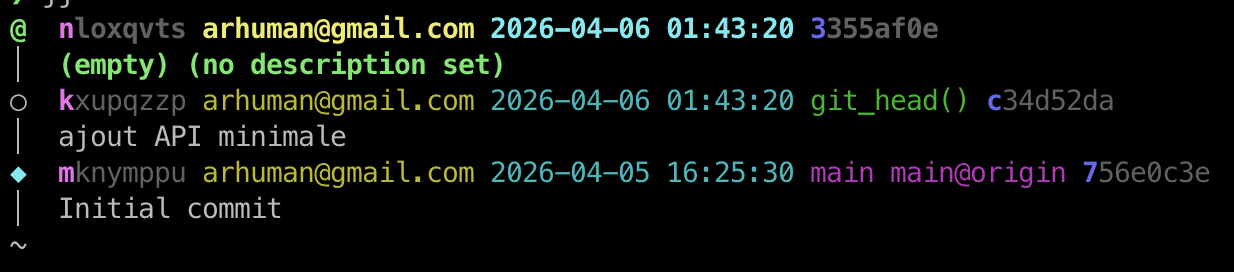
Also note that parts of the changeid (nloxqvts) and of the hash (3355af0e) are in bold: that is the minimal prefix guaranteeing the uniqueness of the identifier. Put differently, you will be able to manipulate your changesets with identifiers (or fragments) of just a few characters.
First development
To add a new POST /tasks endpoint, I modify the code.
// main.go
 package main

 import (
 	"encoding/json"
 	"net/http"
 )

 func main() {
 	http.HandleFunc("/tasks", tasksHandler)
 	http.ListenAndServe(":8080", nil)
 }

 func tasksHandler(w http.ResponseWriter, r *http.Request) {
+       if r.Method == http.MethodPost {
+               var body struct {
+                       Title string `json:"title"`
+               }
+               json.NewDecoder(r.Body).Decode(&body)
+               task := AddTask(body.Title)
+               json.NewEncoder(w).Encode(task)
+               return
+       }
        if r.Method == http.MethodGet {
                json.NewEncoder(w).Encode(ListTasks())
                return
 }
// store.go
 package main

 var tasks = []Task{}
+var nextID = 1
+
+func AddTask(title string) Task {
+       task := Task{
+		            ID:    nextID,
+		            Title: title,
+		            Done:  false,
+	      }
+	      nextID++
+	      tasks = append(tasks, task)
+	      return task
+}

 func ListTasks() []Task {
 	      return tasks
// store_test.go
package main

import "testing"

+func TestAddTask(t *testing.T) {
+         task := AddTask("test")
+	        if task.Title != "test" {
+		              t.Fatal("wrong title")
+	        }
+}
+
 func TestListTasksInitiallyEmpty(t *testing.T) {
 	    got := ListTasks()
and I commit:
jj commit -m "ajout du endpoint /tasks en POST"
Once again jj shows us that the changeset was added as a child, and that a new empty changeset was created.
It is the current changeset and we are ready to add our next modifications.
Working copy  (@) now at: lotzmxpu 4fa2ec2b (empty) (no description set)
Parent commit (@-)      : nloxqvts f558246f ajout du endpoint /tasks en POST
Interrupted commit
For the next change I decide to refactor store.go
// store.go
 package main

-var tasks = []Task{}
-var nextID = 1
+type TaskStore struct {
+	      tasks  []Task
+	      nextID int
+}
+
+var store = TaskStore{
+	    tasks:  []Task{},
+	    nextID: 1,
+}

 func AddTask(title string) Task {
 	    task := Task{
-		          ID:    nextID,
+		          ID:    store.nextID,
 		          Title: title,
 		          Done:  false,
 	    }
-	    nextID++
-	    tasks = append(tasks, task)
+	    store.nextID++
+	    store.tasks = append(store.tasks, task)
 	    return task
 }

 func ListTasks() []Task {
-	      return tasks
+	      return store.tasks
 }
But before finishing, I remember that I have not chosen a license for my code.
So I create a new changeset to work on it.
With git, I would probably have had to use a stash or create an intermediate branch.
With Jujutsu, a simple jj new does the job.
@  lzpqoloy arhuman@gmail.com 2026-04-06 05:43:51 057e22a1
│  (empty) (no description set)
○  lotzmxpu arhuman@gmail.com 2026-04-06 05:43:36 git_head() 467b3f7e
│  (no description set)
○  nloxqvts arhuman@gmail.com 2026-04-06 05:42:30 f558246f
│  ajout du endpoint /tasks en POST
○  kxupqzzp arhuman@gmail.com 2026-04-06 01:43:20 c34d52da
│  ajout API minimale
◆  mknymppu arhuman@gmail.com 2026-04-05 16:25:30 main main@origin 756e0c3e
│  Initial commit
~
Note that the current changeset is now an empty changeset, and that the parent changeset has no description.
Out-of-context work
I create my LICENSE.txt file
# LICENSE.txt
MIT License...
and I commit the change: jj commit -m "ajout de LICENSE.txt"
Navigating changesets
Once the license is added I can go back to my refactoring
jj edit lo
An ls confirms that I am back to the code I left earlier, the LICENSE.txt file being absent.
Where git forces you to “package up” your work (stash or temporary commit) before moving, jj treats your changeset as a full-fledged commit: it waits for you right where you left it.
Mistake detected
I decide to add a CreatedAt field to the model:
// task.go
 package main

+import "time"
+
type Task struct {
 	      ID    int
 	      Title string
 	      Done  bool
+	      CreatedAt time.Time
}
I finish my refactoring of store.go.
// store.go

 package main

+import "time"

...

 	task := Task{
	        ID:    store.nextID,
          Title: title,
		      Done:  false,
+		      CreatedAt: time.Now(),
 	}
That is when I realize, running jj show (the equivalent of git diff), that my modifications belong to two different intentions.
Natural correction
Since a changeset is modifiable by nature, I will simply split it into two “atomic” changesets
jj split: I select store.go with the space key, continue with the c key, and give a description for the newly created changeset, “refactoring de store.go”
jj log
❯ jj
○  lzpqoloy arhuman@gmail.com 2026-04-06 05:49:56 0e104fbe
│  ajout de LICENSE.txt
@  swutzrxp arhuman@gmail.com 2026-04-06 05:49:56 c7a8a72b
│  (no description set)
○  lotzmxpu arhuman@gmail.com 2026-04-06 05:49:34 git_head() 6b3a4a69
│  refactoring de store.go
○  nloxqvts arhuman@gmail.com 2026-04-06 05:42:30 f558246f
│  ajout du endpoint /tasks en POST
○  kxupqzzp arhuman@gmail.com 2026-04-06 01:43:20 c34d52da
│  ajout API minimale
◆  mknymppu arhuman@gmail.com 2026-04-05 16:25:30 main main@origin 756e0c3e
│  Initial commit
~
We can see the new changeset that appeared as parent, with the description “refactoring de store.go”
With jj, fixing a non-atomic commit takes one simple command (jj split), whereas with Git it usually requires a git reset --soft, an interactive git add -p and a git commit. A heavier mental gymnastics.
Re-modifying a changeset
I am still on the changeset (swutzrxp) I have not finished working on.
I add a test for CreatedAt
// store_test.go
package main

- import "testing"
+ import (
+         "testing"
+         "time"
+ )

func TestAddTask(t *testing.T) {
      task := AddTask("test")
      if task.Title != "test" {
              t.Fatal("wrong title")
      }

+     if task.CreatedAt.IsZero() {
+             t.Fatal("CreatedAt should be set")
+     }
+
+     if time.Since(task.CreatedAt) > time.Minute {
+             t.Fatal("CreatedAt seems incorrect")
+     }
}
And while I am at it, I jot down an idea in store.go
                CreatedAt: time.Now(),
  +             // TODO: ajouter UpdatedAt
        }
That done, I change the description to an explicit message:
jj desc -m "ajout du champ CreatedAt"
The description, like the code, is not frozen. This favors producing code, since reorganizing is not constrained by the content or description of commits. You can move forward on the code first, then reorganize the history afterwards.
With git, getting this state cleanly would have required more anticipation: either splitting my changes before committing with the interactive index, or rewriting history afterwards with a combination of reset, partial add and amend/rebase.
With jj, I can move forward first, then restructure after the fact without changing mental models: I am always manipulating changesets.
Logical reorganization of changesets
One thing still bothers me: I would like to group the commit adding the task endpoint with the one adding CreatedAt
❯ jj log
○  lzpqoloy arhuman@gmail.com 2026-04-06 05:54:12 767a77a1
│  ajout de LICENSE.txt
@  swutzrxp arhuman@gmail.com 2026-04-06 05:54:12 b65c4507
│  ajout du champ CreatedAt
○  lotzmxpu arhuman@gmail.com 2026-04-06 05:49:34 git_head() 6b3a4a69
│  refactoring de store.go
○  nloxqvts arhuman@gmail.com 2026-04-06 05:42:30 f558246f
│  ajout du endpoint /tasks en POST
○  kxupqzzp arhuman@gmail.com 2026-04-06 01:43:20 c34d52da
│  ajout API minimale
◆  mknymppu arhuman@gmail.com 2026-04-05 16:25:30 main main@origin 756e0c3e
│  Initial commit
~
Once again jj makes it trivial:
jj rebase -r s -d n
Handling conflicts
But as often happens, a conflict appears:
Rebased 1 commits to destination
Rebased 1 descendant commits
Working copy  (@) now at: swutzrxp 318b863e (conflict) ajout du champ CreatedAt
Parent commit (@-)      : nloxqvts f558246f ajout du endpoint /tasks en POST
Added 0 files, modified 1 files, removed 0 files
Warning: There are unresolved conflicts at these paths:
store.go    2-sided conflict
New conflicts appeared in 1 commits:
  swutzrxp 318b863e (conflict) ajout du champ CreatedAt
Hint: To resolve the conflicts, start by creating a commit on top of
the conflicted commit:
  jj new swutzrxp
Then use `jj resolve`, or edit the conflict markers in the file directly.
Once the conflicts are resolved, you can inspect the result with `jj diff`.
Then run `jj squash` to move the resolution into the conflicted commit
The first thing to remember is that jj has a fantastic command, jj undo, which lets you cancel your commands: you could easily go back to the pre-conflict state and resolve the conflict upstream. But for teaching purposes, I will show you how easy it usually is to handle with jj.
Because here again jj explains the problem clearly and hands us the solution:
jj new swutzrxp
We end up in an empty changeset, child of the conflict, where we can fix it. All it takes is editing the file and resolving it by removing the markers and the wrong section (side #1 here).
package main

func AddTask(title string) Task {
	task := Task{
		ID:    nextID,
		Title: title,
		Done:  false,
<<<<<<< Conflict 1 of 1
%%%%%%% Changes from base to side #1
-		CreatedAt: time.Now(),
+++++++ Contents of side #2
		CreatedAt: time.Now(),
		// TODO: add UpdatedAt
>>>>>>> Conflict 1 of 1 ends
	}
	nextID++
	tasks = append(tasks, task)
	return task
}

func ListTasks() []Task {
	return tasks
}
jj tells us the conflict is gone in the current changeset
@  trzmmrns arhuman@gmail.com 2026-04-06 05:58:30 e1bd96f4
│  (no description set)
×  swutzrxp arhuman@gmail.com 2026-04-06 05:55:20 git_head() 318b863e conflict
│  ajout du champ CreatedAt
│ ○  lzpqoloy arhuman@gmail.com 2026-04-06 05:55:20 6f214b06
│ │  ajout de LICENSE.txt
│ ○  lotzmxpu arhuman@gmail.com 2026-04-06 05:49:34 6b3a4a69
├─╯  refactoring de store.go
○  nloxqvts arhuman@gmail.com 2026-04-06 05:42:30 f558246f
│  ajout du endpoint /tasks en POST
○  kxupqzzp arhuman@gmail.com 2026-04-06 01:43:20 c34d52da
│  ajout API minimale
◆  mknymppu arhuman@gmail.com 2026-04-05 16:25:30 main main@origin 756e0c3e
│  Initial commit
~
We can then push the fix down into the parent with a jj squash.
And observe that the conflict is gone on swutzrxp
@  wryptxru arhuman@gmail.com 2026-04-06 05:59:43 e02d4f06
│  (empty) (no description set)
○  swutzrxp arhuman@gmail.com 2026-04-06 05:59:43 git_head() 52a9f82a
│  ajout du champ CreatedAt
│ ○  lzpqoloy arhuman@gmail.com 2026-04-06 05:55:20 6f214b06
│ │  ajout de LICENSE.txt
│ ○  lotzmxpu arhuman@gmail.com 2026-04-06 05:49:34 6b3a4a69
├─╯  refactoring de store.go
○  nloxqvts arhuman@gmail.com 2026-04-06 05:42:30 f558246f
│  ajout du endpoint /tasks en POST
○  kxupqzzp arhuman@gmail.com 2026-04-06 01:43:20 c34d52da
│  ajout API minimale
◆  mknymppu arhuman@gmail.com 2026-04-05 16:25:30 main main@origin 756e0c3e
│  Initial commit
~
Not only is the resolution simple, but since a conflict is not a state as in git but a modification like any other, I could also choose to work on other changesets and postpone this resolution until later.
Publishing to Github
Finally, when I am satisfied with the quality and organization of my commits, I can create a branch (a bookmark in jj terminology) with:
jj bookmark create -r swutzrxp feat/add-task
Then push it to Github:
jj git push --bookmark feat/add-task --allow-new
The rest is classic Pull Request management on Github, for which this branch is indistinguishable from a branch pushed by git
Synchronizing with Github
Once the Pull Request is merged I can re-synchronize my remote branches:
jj git fetch
Then simplify my log display by realigning the local main branch with the remote main branch
git switch main
git pull
I chose to do these operations by hand to show you how simple manual synchronization is, but jj gives you the option to do it automatically via the command jj bookmark track main --remote origin
Useful commands
In my examples I tried to show how the most problematic commands with git are simple with jj
But the operations that are simple with git stay simple with jj:
jj st(equivalent togit status)jj file show -r @ task.go(almost equivalent togit show HEAD:task.go)jj file annotate store.go(equivalent togit blame store.go)jj log -r 'diff_lines("CreatedAt")'(equivalent togit log -G 'CreatedAt')jj log -r 'diff_lines("empty title", "main.go")'(equivalent togit log -G 'empty title' -- main.go)
jj vs git: the command mapping table
It is the question I get asked most often: “what is the jj equivalent of my git command?” Here is enough to cover the daily essentials:
| Operation | git | jj |
|---|---|---|
| See the state | git status | jj st |
| History | git log --graph | jj log |
| Set work aside | git stash | unnecessary: jj new |
| Prepare a commit | git add -p then git commit | jj commit (or jj split after the fact) |
| Fix the last commit | git commit --amend | modify the changeset, nothing else |
| Move a commit | git rebase -i | jj rebase -r <id> -d <dest> |
| Undo a command | git reflog and prayers | jj undo |
| Create a branch | git switch -c | jj bookmark create |
And no, you do not have to choose between jj and git: as shown above with the colocated mode, jj works on a standard git repository. Your coworkers, your CI and Github will never see the difference.
Conclusion: a paradigm shift
I hope I have made you want to try jj: a tool that does not punish mistakes and makes corrections easy.
But beyond the technical aspect, it is a change in how you think about your work.
With git, I often feel that little pinch when launching a “dangerous” command: rebase, reset --hard, stash drop. The fear of losing work or creating irreversible chaos is real. I end up avoiding certain operations, or doing them with an excessive caution that breaks the rhythm.
With jj, that fear almost entirely disappears, because everything is reversible:
jj undo cancels any command, not just the last one.
A conflict is not a blocking state, but a changeset like any other, which you can resolve later or even leave hanging while you do something else.
I can reorganize my history, split a commit, change its description, all after the fact, without fear of breaking everything. The code becomes malleable, and so does the history.
Of course, jj is not perfect. It is younger than git, its ecosystem is smaller and best practices are still taking shape. But in terms of daily comfort, it really is a game changer.
Because if Git is convenient when you make no mistakes, Jujutsu shines when you do.
To see this workflow in context: my way of coding in Go in 2026 (in French) applies it daily, and The code works. But is it any good? (in French) extends the reflection on why atomic, readable commits matter.
This article is a rewrite of a presentation, a bit too sketchy for my taste, given to my colleagues at EPFL. ↩︎
Or even the notion of Directed Acyclic Graph, if you want to understand some of the constraints. ↩︎
With recent versions,
jj git initis enough because the--colocateoption is enabled by default. ↩︎